napari-lattice
napari-lattice is a toolset for deskewing, deconvolving, cropping, visualising and building custom analysis pipelines for light-sheet microscopy data. It is optimized for Zeiss Lattice Lightsheet 7 (LLS7), but can also handle oblique-plane microscopy data of different configurations.
napari-lattice is now published in Journal of Microscopy
It works both as a napari plugin (GUI) and as a command line
interface (lls-pipeline, powered by lls-core), so you can process data interactively
on the desktop or headless on an HPC at scale. The processing pipeline is modular and
parameter-driven — every step (deskew, deconvolution, cropping, workflows, output) is
configurable, which is what lets napari-lattice adapt to different acquisition geometries.
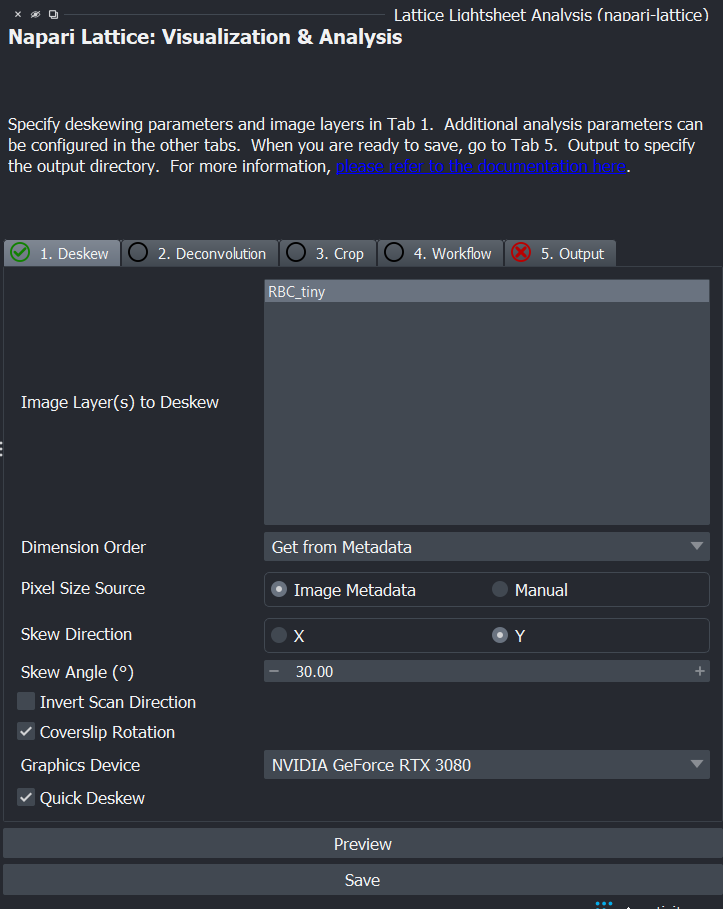
Beyond the Zeiss LLS7
Because the deskew is parameter-driven — you set the skew direction (X or Y), skew
angle, and whether to apply the coverslip rotation — napari-lattice generalises beyond
the Zeiss LLS7. The same pipeline deskews oblique plane microscopy (OPM) data from
non-Zeiss systems in different configurations. See
--no-coverslip-rotation for
an example for OPM/SOPi (shear-only) deskew mode.
What it can do
- Deskew and deconvolve lattice lightsheet data, with a focus on the Zeiss LLS7
- Handle other skewed-acquisition geometries, including oblique plane microscopy (OPM), via configurable skew direction, skew angle and coverslip rotation
- Flip the scan direction (
Invert Scan Direction) for microscopes whose stage/galvo scans run opposite to the Zeiss LLS - Generate a deskewed maximum-intensity projection (MIP) on the fly, computed straight from the raw data without ever building the full deskewed volume — fast and memory-light for terabyte-scale acquisitions
- Preview a deskewed image at a channel or timepoint of interest, without processing the whole volume
- Crop and process only a small region of interest, including ROIs imported from Fiji's ROI Manager
- Build custom image-processing pipelines with
napari-workflows - Run deskewing, deconvolution and workflows from the terminal for batch/HPC processing
- Save output as OME-Zarr, HDF5 (BigDataViewer/BigStitcher) or TIFF
Get started
-
Installation
Install napari-lattice (GUI) or just the
lls-corecommand line interface. -
Napari Plugin
Open the plugin, load your data, and deskew, deconvolve and crop from the GUI.
-
Command Line
Run
lls-pipelinefor headless, scriptable and HPC batch processing. -
Python API
Drive the processing pipeline directly from Python with
LatticeData. -
Workflows
Chain custom analysis steps onto the deskewed image with
napari-workflows. -
Supporting Resources
Preparing ROIs for cropping and other helpful references.
Sample data
Sample lattice lightsheet data is available on Zenodo: https://doi.org/10.5281/zenodo.7117784
Citing
If you use napari-lattice in your work, please cite:
Rajasekhar, P., Milton, M., Geoghegan, N. D., Zaman, I., Ashdown, G. W., Haase, R., Iskander, J., Coussens, A. K., Rogers, K. L., & Whitehead, L. (2026). napari-lattice: A user-friendly image processing tool for lattice light-sheet microscopy data. Journal of Microscopy, 1–12. https://doi.org/10.1111/jmi.70167
Acknowledgment
This project was supported by funding from the Rogers Lab at the Centre for Dynamic Imaging at the Walter and Eliza Hall Institute of Medical Research, and made possible in part by a napari plugin accelerator grant from the Chan Zuckerberg Initiative DAF, an advised fund of the Silicon Valley Community Foundation.